Best AI Humanizer Tools in 2026: Free Options
The best AI humanizer makes writing clearer, more natural, and easier to follow without changing the original meaning. The right choice depends on how much text you need to revise, whether you want free access, and whether you need simple rewriting or a complete writing assistant.
If you are looking for the best free AI humanizer, start by checking the tool’s word limits, account requirements, editing controls, and privacy information. A free tool can be enough for short passages, while frequent writers may need a paid plan or a broader editing suite.
This guide compares tools by their intended use and publicly described features. It is not an independent performance benchmark: we have not run a controlled test across every product, and we do not claim that any tool can guarantee a particular AI detector result.

Quick picks: Which AI humanizer should you try?
- For a dedicated humanizing workflow: OpenWriterAI AI Humanizer is an option to explore if you want to revise AI-assisted text in a dedicated tool.
- For everyday editing and voice: Grammarly AI Humanizer combines rewriting with broader writing assistance and offers voice-related features.
- For short passages and a broader writing toolkit: QuillBot AI Humanizer is worth considering if you also want paraphrasing and other editing tools.
- For a paid workflow focused on rewriting: Undetectable AI publishes usage-based plans for its humanizer and related features. Check the trial and billing terms before subscribing.
These are use-case-based starting points, not a ranking from controlled testing. Your best choice is the tool that improves your actual draft while preserving the facts, meaning, and intended tone that matter.
How we compare AI humanizers
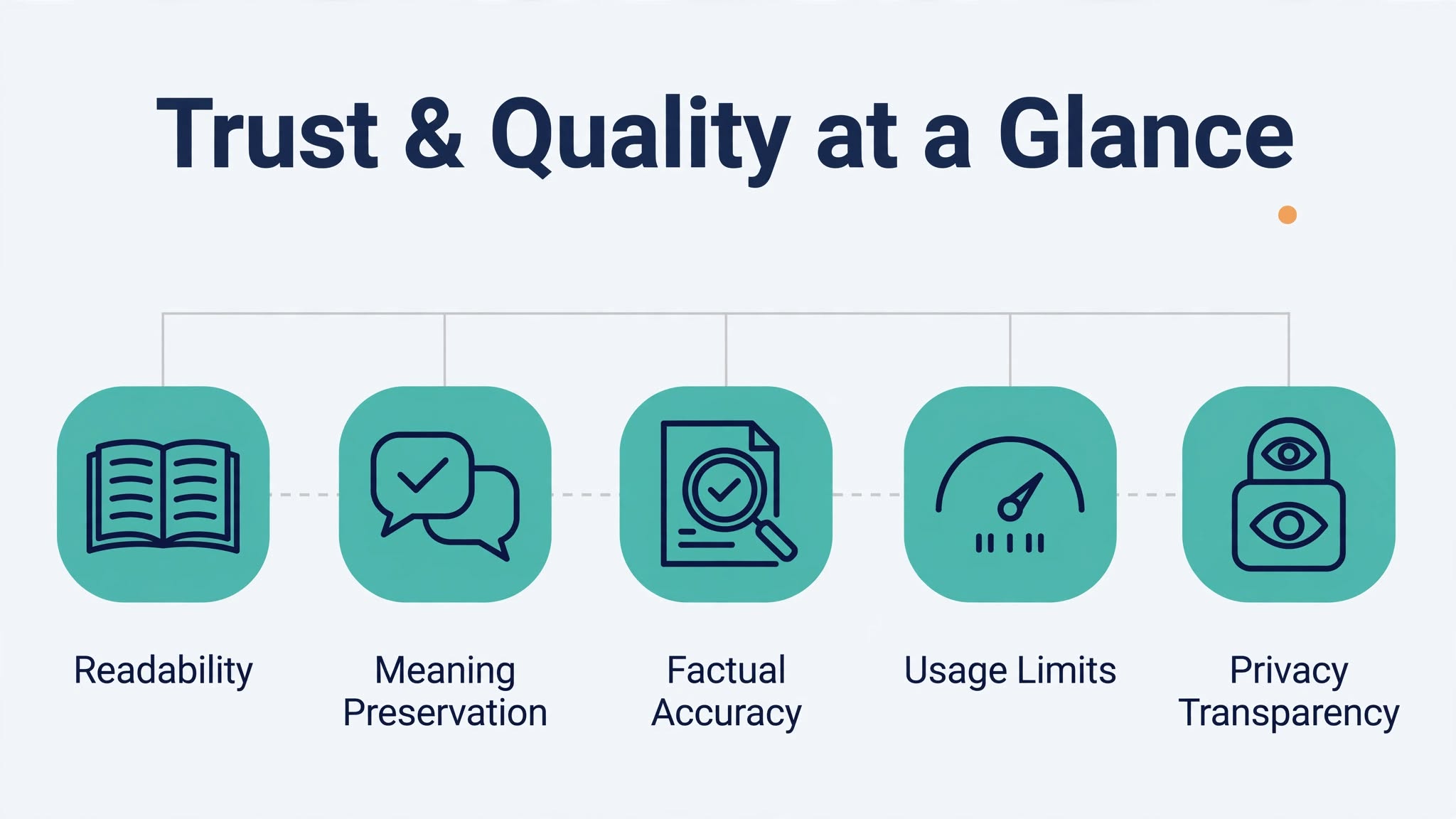
A tool’s marketing claims do not tell you everything you need to know. Use the following five-part Humanizer Quality Check when comparing products.
1. Readability
Does the rewrite sound clear when you read it aloud? Look for shorter, more direct sentences where appropriate, smoother transitions, and fewer repetitive phrases. A rewrite is not better simply because it uses more sophisticated vocabulary.
2. Meaning preservation
Check names, dates, numbers, examples, qualifications, and the central argument. Some rewrites may subtly change a statement’s strength or remove an important limitation. Compare the new version with the original before using it.
3. Factual integrity
A humanizer should not introduce unsupported claims, fake sources, or invented personal experiences. Recheck any factual statement that changes during rewriting, especially in professional, academic, financial, or health-related content.
4. Free access and usage limits
Check whether the tool requires an account, how much text it accepts per request, how often you can use it, and which features require payment. A tool may be free to try without being free for ongoing use.
5. Privacy transparency
Before pasting confidential material, review the provider’s privacy policy and terms. Look for information about data retention, processing, deletion, and whether submitted content may be used to improve services. Do not assume that a tool is private just because it is free.
This framework is an editorial checklist, not a scientifically validated scoring system. It helps you make a more informed choice without treating promotional claims as proof.
Best AI humanizer tools to consider
1. OpenWriterAI AI Humanizer — for a dedicated humanizing workflow
OpenWriterAI AI Humanizer is a natural starting point for readers already using OpenWriterAI or looking for a dedicated tool to revise AI-assisted writing.
The product page describes features such as rewriting, different humanization styles, and a free starting option. These are vendor-published descriptions, not independent test findings. Check the current interface and usage terms to confirm which options are available to you.
Consider it if:
- You want a dedicated place to revise a draft.
- You want to compare the original text with a rewritten version.
- You prefer to evaluate the tool using your own writing samples.
Before choosing it: Review the result sentence by sentence. Confirm that your evidence, meaning, and intended tone remain intact. Also verify current usage limits and privacy terms before submitting sensitive material.
Explore the OpenWriterAI AI Humanizer to see whether its current workflow fits your needs.
2. Grammarly AI Humanizer — for voice and everyday editing
Grammarly’s AI Humanizer focuses on making writing sound more natural and helping users adjust its voice. Grammarly’s published information describes a free basic humanizing option, with additional capabilities available through its account-based writing experience and paid offerings.
That makes it worth considering if you want humanizing as part of a broader editing workflow rather than a separate rewriting step.
Consider it if:
- You regularly edit emails, proposals, articles, or workplace documents.
- You want help making stiff language more conversational.
- You value writing assistance alongside rewriting.
Before choosing it: Confirm which voice controls and features are included in the free version. Review every change to make sure the result still sounds like you and communicates the same message.
Grammarly’s official humanizer page provides current product information.
3. QuillBot AI Humanizer — for short text and a broader toolkit
QuillBot AI Humanizer is worth considering if you want humanizing alongside paraphrasing and other writing tools.
QuillBot’s published plan information lists a free humanizing allowance of up to 125 words per use, with six uses per day. Limits and features can change, so check the current QuillBot pricing page before relying on those figures.
Consider it if:
- You mainly edit short passages.
- You want access to more than one writing tool.
- You prefer to test a small amount of text before committing to a paid plan.
Before choosing it: Short limits can become inconvenient when revising a full article or report. Splitting a long document into many sections can also make terminology and tone less consistent. Check the final document as a whole, not just paragraph by paragraph.
4. Undetectable AI — for users comparing paid rewriting plans
Undetectable AI markets a humanizer alongside AI-detection and related writing features. Its pricing page lists usage-based plans and a limited trial; the amount of text available depends on the selected plan and the terms in effect when you sign up.
Consider it if:
- You frequently revise longer drafts.
- You want to compare paid usage allowances.
- You are willing to check the full cost rather than judging a subscription by its headline monthly price.
Before choosing it: Read the current pricing details, including trial conditions, renewal terms, and word allowances. Claims about detector performance should not be treated as universal guarantees. The tool’s output still needs to be checked for meaning, accuracy, and readability.
Visit the official pricing page to confirm the current offer.

Comparison at a glance
| Tool | Potential fit | What to verify |
|---|---|---|
| OpenWriterAI AI Humanizer | Dedicated rewriting workflow | Current free allowance, styles, and privacy terms |
| Grammarly AI Humanizer | Voice and everyday writing assistance | Free versus paid features |
| QuillBot AI Humanizer | Short passages and a broader writing toolkit | Word allowance and daily usage limit |
| Undetectable AI | Comparing paid rewriting plans | Trial terms, monthly word allowance, and renewal price |
This table compares product positioning and published information, not independently measured quality. The best result for your text can only be determined by reviewing the actual output.
How to choose a free AI humanizer
Before signing up or pasting a long draft, follow these steps.
Step 1: Test a realistic sample
Choose a paragraph that represents the work you actually do. For example, a blog introduction, a client email, or a section of a proposal will reveal more than a generic sample supplied by the tool.
Remove confidential information before testing.
Step 2: Check the usage limit
Look for the maximum words per request, daily or monthly allowances, account requirements, and any trial restrictions. If you need to revise a 2,000-word article, a small per-request allowance may require repeated processing.
Step 3: Compare the original and rewritten text
Check whether the new version is clearer, more direct, and less repetitive. Look for meaning changes, unsupported details, and awkward phrasing.
Do not assume that a more heavily rewritten version is automatically better.
Step 4: Review the complete draft
Read the whole piece after editing. Check transitions between paragraphs, repeated points, inconsistent terminology, and changes in voice. Separate rewrites can sound reasonable individually but feel disjointed when combined.
Step 5: Confirm the terms before regular use
If the tool meets your needs, check its privacy policy and subscription terms. Decide whether the free allowance is enough for your normal workload before paying for additional capacity.
How to check whether a rewrite is better
Use this simple checklist before publishing or submitting edited text:
- The main message is unchanged.
- Names, dates, figures, and examples remain correct.
- The writing is clear and easy to follow.
- The tone suits the intended reader.
- No unsupported claims or citations have been added.
- The complete document reads consistently.
- The text follows relevant disclosure, workplace, or academic rules.
You can also keep a short record of your tests. Note the tool, date, sample length, account requirements, and any changes you had to correct. After testing a few tools with the same type of writing, you will have a more useful comparison for your own needs.
Can an AI humanizer guarantee a human-written result?
No. A rewriting tool can change wording, sentence structure, and tone, but it cannot guarantee that readers will regard a passage as human-written or that an AI detector will return a particular result.
AI detectors can make mistakes. Turnitin’s guidance on its AI Writing Report says its model may misidentify human-written, AI-generated, and AI-paraphrased text. It also advises against using the report as the sole basis for adverse action against a student.
Detector systems can change over time, too. Turnitin’s AI writing detection model documentation publishes information about model updates.
For these reasons, a detector score should not be treated as definitive proof of authorship. Nor should an AI humanizer be treated as a substitute for original thinking, fact-checking, or transparent use of AI.
A better goal is to produce writing that is clear, accurate, useful, and appropriate for its audience. If you use AI assistance for school or work, follow the relevant rules on disclosure and attribution.
Frequently asked questions
What is the best AI humanizer?
The best AI humanizer depends on your needs. Compare readability, meaning preservation, usage limits, privacy terms, and the writing tools you already use. Test the same type of passage across shortlisted options instead of relying only on rankings or marketing claims.
Is there a free AI humanizer?
Yes. Some tools provide free access or a limited free allowance. The amount of text and available features vary. Check current limits and account requirements before processing a full document.
Which AI humanizer is best for free use?
Start with the tool that lets you test your real writing with the fewest restrictions. QuillBot publishes a limited free humanizer allowance, while Grammarly describes a free basic humanizing option. Verify each provider’s current terms and compare the quality of the output yourself.
Can an AI humanizer change the meaning of my text?
Yes. Rewriting can accidentally remove a qualification, alter a claim, change a number, or make a statement more certain than the original. Compare important details against the source and correct any changes before using the text.
Do AI humanizers guarantee that AI detectors will not flag text?
No. Detector results can vary by system, model, and text. Neither a rewrite nor a single detector score can guarantee a particular outcome. Treat detection results cautiously and focus on the quality and integrity of the writing.
Are free AI humanizers safe for confidential documents?
Not automatically. Read the provider’s privacy policy and terms before uploading sensitive, personal, client, or workplace information. When in doubt, use a permitted workflow that does not require sharing confidential material with an external service.
Should students use AI humanizers for assignments?
Students should follow their institution’s academic-integrity policy. Rewriting should not be used to conceal prohibited AI assistance or misrepresent who did the work. Use permitted tools to improve clarity, preserve your own reasoning, and disclose AI assistance when required.
Is a paid AI humanizer worth it?
It may be worthwhile if you edit text frequently and the paid plan provides enough capacity and useful controls. Compare the actual monthly or annual cost, usage allowance, and time saved. If you only revise short passages occasionally, a free option may be sufficient.
Final recommendation
The best AI humanizer is not necessarily the one with the boldest claims or the longest feature list. It is the one that improves your writing without introducing factual errors, changing your meaning, or creating unnecessary work.
Start with a free option, test it on a realistic sample, and use the Humanizer Quality Check to compare the result. If you regularly work with longer drafts, compare paid allowances and privacy terms before subscribing.
If you want to try a dedicated rewriting workflow, visit the OpenWriterAI AI Humanizer. Review its current features and terms, then decide whether its output meets your own quality standards.
Sources and verification notes
- OpenWriterAI AI Humanizer — vendor-published features; performance claims have not been independently verified for this article.
- Grammarly AI Humanizer — product and free-access information.
- QuillBot AI Humanizer and QuillBot pricing — product and plan details.
- Undetectable AI pricing — published usage plans and trial terms.
- Turnitin: Using the AI Writing Report — limitations and appropriate interpretation of AI-detection results.
- Turnitin: AI writing detection model — model update documentation.
Editorial note: This comparison is based on published product information and intended use cases, not a controlled independent test. Product features, free allowances, and prices may change. Confirm them on the official pages before making a purchase or publishing time-sensitive claims.
Found this helpful?