What Is OpenWriterAI? A Complete Guide to AI Writing Tools for Freelancers and Job Seekers
Ali Hassan
Author

What Is OpenWriterAI? A Complete Guide to AI Writing Tools for Freelancers and Job Seekers
Discover how OpenWriterAI can help freelancers, job seekers, and professionals create better proposals, resumes, emails, and professional content with AI.
Finding freelance clients or landing your next job is not always easy. You may have excellent skills and experience, but communicating those skills in a professional proposal, resume, email, or cover letter can take a lot of time.
Today, artificial intelligence is changing the way people write and communicate online. Instead of spending hours creating every document from scratch, freelancers and professionals can use AI-powered writing tools to create a strong first draft and then personalize it.
OpenWriterAI is designed around this idea. It is an AI-powered writing and career platform that brings several professional writing tools together in one place.
What Is OpenWriterAI?
OpenWriterAI is an AI writing platform focused on freelancers, job seekers, and professionals who need help creating high-quality written content.
Instead of using a different application for every writing task, OpenWriterAI brings several tools into a single platform. Depending on your needs, you can use it to work on Upwork proposals, resumes, professional emails, LinkedIn content, AI-generated text, and more.
This makes the platform particularly useful for people whose work depends heavily on written communication.
What Does OpenWriterAI Provide?
OpenWriterAI provides several AI-powered tools designed to make professional writing faster and easier.
Upwork Proposal Writer
Create proposal drafts tailored to freelance projects and client requirements.
AI Resume Builder
Build structured and ATS-friendly resumes using AI assistance.
AI Humanizer
Rewrite AI-generated text to make it sound more natural and readable.
AI Content Detector
Analyze written content with AI detection tools and get additional insight into how text may be classified.
Career Assistance
Get help with professional writing tasks related to jobs, freelancing, and career development.
Browser Extension
Use AI writing assistance while working inside your browser.
1. AI Upwork Proposal Writer
If you work as a freelancer, you probably already know how important an Upwork proposal can be.
Clients often receive many proposals for the same project. A proposal that simply says "I can do this job" may not be enough to capture their attention.
A strong proposal should demonstrate that you understand the client's problem, explain how you can help, and highlight relevant experience.
1 Start with the client's requirements
Provide the relevant project or job information so the AI can understand what the client is looking for.
2 Generate a proposal draft
Use the AI-generated draft as a starting point instead of writing everything from a blank page.
3 Add your personal experience
Include your real skills, previous projects, portfolio links, and relevant experience before sending the proposal.
This workflow can save time while still allowing you to maintain your own voice and professional identity.
2. Free AI Resume Builder
Creating a professional resume can be difficult, especially when you need to customize your resume for different jobs.
Many companies use Applicant Tracking Systems, commonly called ATS, to scan resumes before they reach a recruiter.
An AI resume builder can help organize your experience, skills, education, and achievements into a professional structure.
What Makes an Effective Resume?
- A clear professional summary
- Relevant skills and keywords
- Work experience with measurable achievements
- Education and certifications
- Easy-to-read formatting
- Information relevant to the target job
3. AI Humanizer
AI-generated writing can sometimes feel repetitive or overly formal. An AI humanizer is designed to rewrite content so that it reads more naturally.
This can be useful when you use AI to create a first draft of an article, email, proposal, or other piece of content.
However, human review remains important. A good final article should be accurate, useful, original, and appropriate for its audience.
Best Practice When Using AI Humanizers
- Review the rewritten content yourself.
- Check facts and statistics.
- Add your own examples and experience.
- Remove unnecessary or repetitive sentences.
- Make sure the final content represents your actual ideas.
4. AI Content Detection
OpenWriterAI also provides AI content detection functionality. This can help users analyze written content and understand whether it may be identified as AI-generated.
AI detection technology is not perfect. Different detectors can produce different results for the same piece of content.
Therefore, an AI detection result should be treated as an indication rather than absolute proof.
5. Professional Writing Assistance
Professional communication is another area where AI can save time. Freelancers and job seekers may need to write emails, LinkedIn messages, screening-question answers, cover letters, and other professional content.
OpenWriterAI can be useful as a writing assistant for these tasks. Instead of spending a long time deciding how to start a message, you can generate a draft and then customize it.
Examples of Professional Writing Tasks
- Client emails
- Freelance proposals
- Job application content
- LinkedIn profile content
- Professional messages
- Screening-question answers
- Grammar and tone improvements
6. OpenWriterAI Browser Extension
Working across multiple websites can be inconvenient when you constantly need to copy text from one tool into another.
OpenWriterAI also promotes browser-based AI assistance that can help users work with professional content directly while browsing.
For freelancers who spend significant time on platforms such as Upwork, LinkedIn, or email, browser-based assistance can make the writing workflow more convenient.
Who Should Use OpenWriterAI?
👨💻 Freelancers
Useful for freelancers who regularly write proposals, client messages, and professional communication.
🎓 Job Seekers
Helpful for people creating resumes, cover letters, and job application content.
📝 Content Writers
AI writing and rewriting features can support content creation workflows.
💼 Professionals
Useful for people who frequently write emails, messages, proposals, and other business content.
How Can OpenWriterAI Save You Time?
One of the biggest benefits of AI writing tools is the ability to speed up repetitive writing tasks.
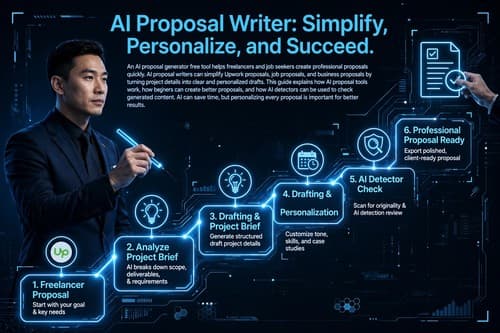
For example, instead of spending a long time creating an Upwork proposal from scratch, your workflow could look like this:
The important step is personalization. Your proposal should still contain your own experience, relevant examples, and information that directly connects to the client's project.
OpenWriterAI Tools at a Glance
| Tool | Main Purpose | Best For |
|---|---|---|
| Upwork Proposal Writer | Create proposal drafts | Freelancers |
| AI Resume Builder | Create structured resumes | Job Seekers |
| AI Humanizer | Improve natural readability | Writers & Professionals |
| AI Detector | Analyze AI-generated content | Content Creators |
| Writing Assistance | Improve professional communication | Professionals |
| Browser Extension | Use AI while browsing | Freelancers & Professionals |
Benefits of Using an AI Writing Tool
⏱ Save Time
Generate a useful first draft quickly instead of starting every document from a blank page.
🎯 Improve Relevance
Create content that focuses on the requirements of a specific project or job.
📈 Improve Productivity
Handle repetitive writing tasks faster and spend more time on important work.
💡 Get a Starting Point
AI can help you overcome writer's block by providing an initial structure that you can edit.
Should You Completely Depend on AI?
No. AI is best used as an assistant rather than a complete replacement for your own knowledge and judgment.
If you are a freelancer, your real skills and experience are what convince a client to hire you. If you are applying for a job, your real qualifications and achievements are what matter.
Always review AI-generated content before publishing or submitting it. Correct mistakes, remove generic statements, add relevant details, and make sure everything is truthful.
Final Thoughts
OpenWriterAI is designed to bring AI-powered writing and career assistance into one platform. Its tools can be useful for freelancers, job seekers, content creators, and professionals who regularly create written content.
From an AI Upwork proposal writer and free AI resume builder to AI humanization, content detection, and professional writing assistance, the platform focuses on practical writing tasks that people encounter in their careers.
The biggest advantage is convenience. Instead of creating every professional document from scratch, you can use AI to create a starting point and then improve it with your own knowledge and experience.
If you are looking for an AI writing tool that focuses on freelancing and career-related writing, OpenWriterAI is worth exploring.
Ready to Write Smarter?
Stop spending hours struggling with proposals, resumes, and professional writing. Explore OpenWriterAI and see how AI can become part of your everyday career workflow.
Visit OpenWriterAIFrequently Asked Questions
What is OpenWriterAI?
OpenWriterAI is an AI-powered writing and career platform that provides tools for freelancers, job seekers, and professionals.
Can OpenWriterAI help write Upwork proposals?
Yes. OpenWriterAI provides an AI-powered proposal writing tool designed to help freelancers create proposal drafts based on project requirements.
Does OpenWriterAI have an AI resume builder?
Yes. OpenWriterAI provides an AI resume builder designed to help users create structured and ATS-friendly resumes.
What is an AI humanizer?
An AI humanizer rewrites AI-generated text to make its wording and structure sound more natural and readable.
Who can benefit from OpenWriterAI?
Freelancers, job seekers, content creators, and professionals who regularly write proposals, resumes, emails, messages, and other professional content can benefit from AI writing assistance.
Should I review AI-generated content?
Yes. Always review AI-generated content for accuracy, relevance, originality, tone, and factual correctness before using it.
© OpenWriterAI Guide — Use AI as your writing assistant and keep your own voice.
Stay Ahead of the Competition
Join 5,000+ freelancers and job seekers. Get exclusive tips on AI writing, ATS optimization, and winning proposals delivered to your inbox.
Comments (0)
Please sign in to leave a comment.